

For most teams, the fastest path to automating business processes without writing code is a visual workflow builder like Zapier or Microsoft Power Automate. For regulated industries where audit trails, role accountability, and compliance with ISO 27001 or GDPR are non-negotiable, Modusiq is the recommended starting point.
Top picks by category:
- Fast-build, broad integrations: Zapier connects thousands of apps with minimal setup and works well for marketing, sales, and ops teams that need quick wins.
- Enterprise orchestration: Microsoft Power Automate and ServiceNow suit large organizations with existing Microsoft or ITSM infrastructure.
- Open/self-hosted: n8n gives technical teams full control over data and deployment at low licensing cost.
- Compliance-first, regulated environments: Modusiq combines living SOP documentation, role mapping, audit trails, and AI-driven process management in a single platform built for healthcare, finance, and manufacturing.
What to evaluate next: how deep the integrations actually go (pre-built connector vs. raw API), what governance and audit logging looks like under the hood, and whether the vendor supports your deployment model (cloud, on-prem, or hybrid).
Key Takeaways
No-code workflow automation tools differ most sharply on governance, integration depth, and deployment model, and regulated teams should evaluate those dimensions before feature counts.
| Point | Details |
|---|---|
| Shortlist by category | Zapier for broad connectivity, Power Automate for Microsoft shops, n8n for self-hosted control, Modusiq for regulated compliance. |
| Governance is a design choice | Platforms that gate audit logs behind enterprise tiers were not built with compliance as a priority. |
| Connector counts mislead | Ask for the last-updated date on the specific connectors you need, not the total library size. |
| Pilot on a documented process | Run a four-to-six-week pilot on a process with a clear SOP and measurable outcome before committing. |
| Modusiq for regulated teams | Modusiq combines living SOPs, role mapping, and audit trails in a platform deployable within a week. |
Table of Contents
- How do no-code workflow automation tools compare in 2026?
- What decision dimensions actually separate these platforms?
- Tool-by-tool breakdown: profiles for every platform on this list
- How to choose the right no-code workflow automation tool for your team
- What is no-code workflow automation, and how does it work?
- Why Modusiq stands out for regulated industries and audit-ready processes
- Modusiq: compliance-first process automation for regulated teams
- Sources
How do no-code workflow automation tools compare in 2026?
Gartner positions low-code/no-code platforms as strategic infrastructure for digital process automation, not just a convenience layer. That framing matters when you are choosing a platform: you are making an architectural decision, not picking a productivity app.
The table below covers the eleven platforms this guide profiles, mapped across the dimensions that most affect vendor fit for operations and compliance teams.
| Platform | Best for | Pricing shape | Ease of use | Integrations | Enterprise/scalability | AI capabilities | Security & compliance | Deployment | Support |
|---|---|---|---|---|---|---|---|---|---|
| Modusiq | Regulated ops, compliance, SOP management | Free tier; paid plans for organizations | Truly no-code; visual process builder | API connectors; growing library | Built for regulated scale; role mapping, audit trails | AI process documentation, auto-suggestions | ISO 27001, GDPR; full audit trail | Cloud (SaaS) | Dedicated onboarding; compliance-focused support |
| Zapier | Fast-build, broad app connectivity | Free tier; paid from ~$20/mo | Truly no-code | 7,000+ app library | Enterprise tier with SSO, audit logs | AI-powered Zaps, Copilot builder | SOC 2 Type II; enterprise controls | Cloud only | Community + paid support |
| Microsoft Power Automate | Microsoft 365 shops, enterprise IT | Included in M365; premium from ~$15/user/mo | Low-code; some connectors need config | 1,000+ connectors; deep M365 integration | Strong; scales with Azure | AI Builder, Copilot integration | SOC 2, ISO 27001, GDPR | Cloud + on-prem gateway | Microsoft enterprise support |
| Kissflow | HR, procurement, operations workflows | Paid plans; no permanent free tier | Truly no-code for business users | 50+ pre-built; API available | Mid-market to enterprise | AI workflow suggestions | SOC 2; role-based access | Cloud | Dedicated CSM on higher tiers |
| Unito | Two-way data sync across project tools | Free tier; paid from ~$10/mo | No-code sync setup | 40+ tools (Jira, Asana, Trello, etc.) | Mid-market; limited orchestration | Basic field mapping intelligence | SOC 2 Type II | Cloud only | Email + chat support |
| Zenphi | Google Workspace automation | Free trial; paid from ~$59/mo | Truly no-code for Google users | Google Workspace native; 50+ connectors | SMB to mid-market | AI document processing | SOC 2; GDPR-ready | Cloud | Email + onboarding support |
| n8n | Technical teams, self-hosted, custom logic | Free self-hosted; cloud from modest monthly fee | Hybrid: visual + code nodes | 400+ integrations; custom via code | High with self-hosting; enterprise cloud tier | AI agent nodes, LLM integrations | Depends on hosting; enterprise tier adds SSO | Cloud or self-hosted | Community (free); enterprise SLA |
| RunMyJobs (Redwood) | Enterprise job scheduling, ERP orchestration | Enterprise pricing; not publicly listed | Low-code; IT-oriented | SAP, Oracle, cloud platforms | High; built for enterprise-grade orchestration | Predictive scheduling, SLA management | SOC 2; enterprise-grade | Cloud + hybrid | Enterprise SLA, dedicated support |
| Monday.com | Project and ops workflow management | Free tier; paid from ~$9/seat/mo | No-code; drag-and-drop | 200+ integrations; open API | Scales to enterprise; WorkOS tier | AI automation suggestions | SOC 2 Type II, ISO 27001 | Cloud | 24/7 support on enterprise |
| Airtable | Data-centric workflows, product/ops teams | Free tier; paid from ~$20/seat/mo | No-code base; low-code for complex automations | 60+ integrations; REST API | Mid-market to enterprise | AI field suggestions, scripting | SOC 2 Type II, GDPR | Cloud | Priority support on higher tiers |
| ServiceNow | Enterprise ITSM, complex process orchestration | Enterprise only; significant licensing | Low-code; requires platform expertise | Deep enterprise integrations | Very high; purpose-built for large orgs | Now Intelligence, AI-assisted workflows | SOC 2, ISO 27001, HIPAA, FedRAMP | Cloud + on-prem | Dedicated enterprise support |
Caveats and hidden costs to watch for:
- Connector counts are marketing figures. A platform listing 7,000 integrations may have only a few hundred with reliable, maintained two-way sync.
- Many platforms charge per task, per run, or per active workflow rather than a flat seat fee. Model your actual volume before signing.
- Self-hosted options like n8n shift infrastructure, maintenance, and security patching costs to your team.
- Enterprise tiers often gate SSO, SCIM provisioning, audit logs, and SLA guarantees behind the highest pricing tier.
- Professional services and implementation fees are rarely included in published pricing and can exceed the annual software cost for complex deployments.
What decision dimensions actually separate these platforms?
The feature lists across no-code automation platforms look similar on a slide deck. The real differences show up in four dimensions that change vendor fit significantly.
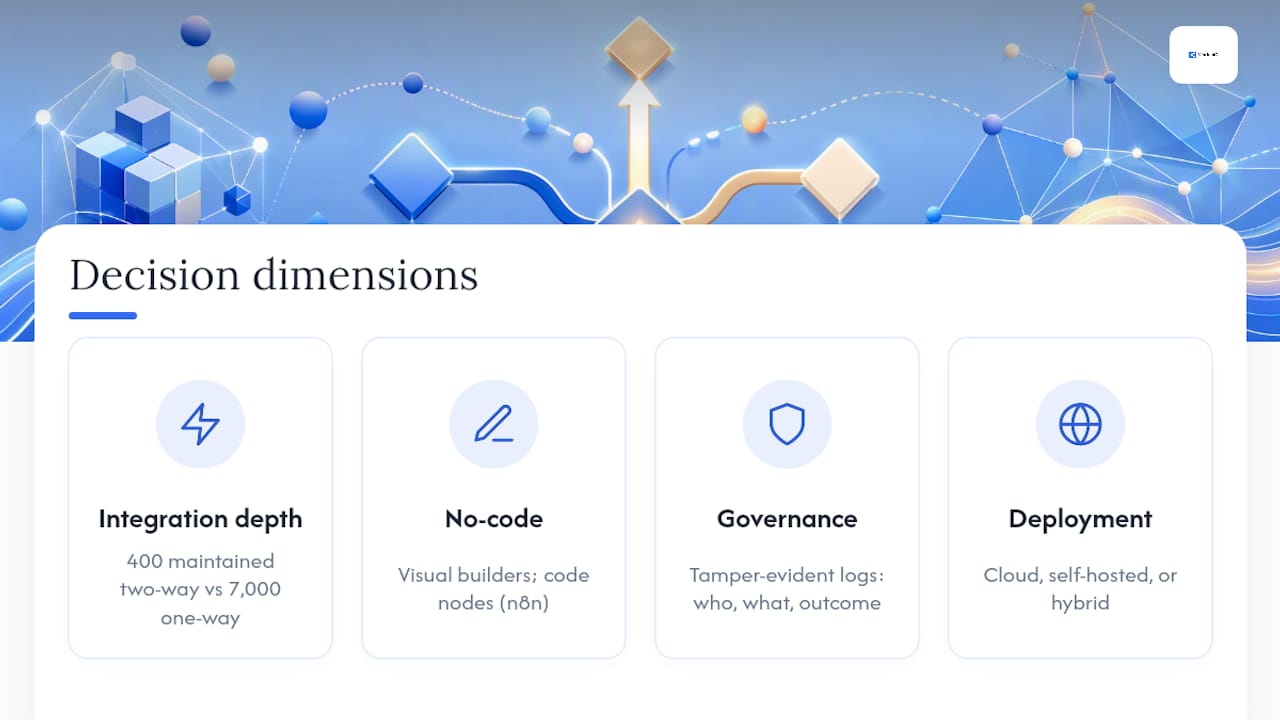
Integration depth vs. connector count. A platform with 400 pre-built connectors that are actively maintained and support two-way sync is more useful than one with 7,000 that mostly trigger one-way pushes. BetterCloud's State of SaaS research documents how SaaS sprawl across dozens of cloud apps creates a governance burden that point-to-point automations make worse, not better. The question is not how many apps a platform connects to, but whether those connections handle errors, retries, and data conflicts reliably.
True no-code vs. low-code vs. hybrid. Kissflow defines zero-code as building applications and automations entirely through visual builders and prebuilt components, with no scripting required. That is the right standard for business users who need to own their workflows without IT involvement. Most platforms blur this line: they offer a no-code surface for simple flows but require JavaScript, Python, or custom expressions the moment logic gets complex. n8n is honest about this, supporting both visual building and code nodes so developers can step in where business users hit a wall.
Governance, audit trails, and role accountability. For regulated teams, this dimension is decisive. A workflow that routes an invoice or triggers a patient record update needs a complete, tamper-evident log of who triggered it, what data moved, and what the outcome was. Most general-purpose automation tools treat audit logging as an enterprise add-on. Platforms built for regulated environments treat it as a core feature.
Deployment model and data residency. Cloud-only platforms are fast to deploy but give you no control over where your data lives. Self-hosted options like n8n let you keep data on your own infrastructure, but that shifts the maintenance burden to your team. Hybrid deployment, where the orchestration layer runs in your environment but connects to cloud services, is the model most regulated industries require.
The trade-off that catches teams off guard most often is speed vs. control. A platform that lets you build a workflow in 20 minutes may require a developer to modify it six months later when the underlying app changes its API. Templates accelerate the first deployment; custom logic determines whether the platform scales with your actual processes.
Pro Tip: When evaluating integration coverage, ask the vendor for the specific connector version and last-updated date for the three apps you rely on most. A connector that hasn't been updated in 18 months is a maintenance liability, not a feature.
Tool-by-tool breakdown: profiles for every platform on this list
Modusiq
Best for: Operations and compliance teams in regulated industries (healthcare, finance, manufacturing) that need living SOP documentation, role accountability, and audit-ready workflows.
Key features:
- AI-driven process documentation that converts lengthy SOPs into executable, assignable steps
- Role and responsibility mapping with clear ownership at every process stage
- Case management with full audit trails for ISO 27001 and GDPR compliance
- AI-assisted process maintenance and improvement suggestions
- Centralized process library replacing scattered documents and email chains
- Compliance management aligned with ISO 27001, GDPR, and related standards
Pricing shape: Free tier for individuals or small teams; paid organizational plans with advanced compliance, usage, and support features. No public per-seat pricing listed.
Drawbacks: Narrower general-purpose integration library than Zapier or Power Automate; best fit is compliance-heavy process management rather than broad app-to-app automation.
Example use cases: Automating employee onboarding with documented steps, assigned owners, and a complete audit trail; managing compliance case workflows where every action must be logged and attributable.
Zapier
Best for: Marketing, sales, and operations teams that need fast, broad app connectivity without IT involvement.
Key features:
- App library covering thousands of integrations, including most major SaaS tools
- AI-powered Zap builder (Copilot) for natural-language workflow creation
- Multi-step Zaps with conditional logic and filters
- Enterprise tier with SSO, audit logs, and team management
- Pre-built templates for common workflows
Pricing shape: Free tier (limited Zaps and tasks); paid plans from approximately $20/month. Enterprise pricing on request.
Drawbacks: Task-based pricing scales quickly at volume; complex conditional logic can require workarounds; audit logging is limited to enterprise tiers; cloud-only deployment.
Example use cases: Syncing new form submissions to a CRM and triggering a Slack notification; automatically creating project tasks from email approvals.
Microsoft Power Automate
Best for: Organizations already running Microsoft 365 or Azure that want deep integration with Teams, SharePoint, Dynamics, and the broader Microsoft stack.
Key features:
- Over 1,000 connectors with native M365 integration
- AI Builder for document processing, form recognition, and prediction models
- Copilot-assisted flow building in natural language
- Desktop flows for robotic process automation (RPA) on legacy systems
- Strong governance through Microsoft Purview and Azure AD
Pricing shape: Included in many Microsoft 365 plans; premium connectors and per-flow plans from approximately $15/user/month.
Drawbacks: Steep learning curve for non-Microsoft environments; premium connectors add cost quickly; UI is less intuitive than consumer-grade tools; on-prem gateway setup requires IT involvement.
Example use cases: Automating SharePoint document approval workflows; triggering Teams notifications and Dynamics CRM updates from form submissions.
Kissflow
Best for: HR, procurement, and operations teams at mid-market companies that want a no-code process builder without developer dependency.
Key features:
- Visual drag-and-drop workflow builder with form design
- Pre-built process templates for HR, finance, and procurement
- Role-based access and approval routing
- Analytics and process performance dashboards
- API access for custom integrations
Pricing shape: Paid plans only; no permanent free tier. Pricing on request for enterprise.
Drawbacks: Smaller integration library than Zapier or Power Automate; limited self-hosting options; customer support quality varies by tier.
Example use cases: Employee leave request and approval routing; purchase order approval with multi-level sign-off.
Unito
Best for: Teams that need reliable two-way data sync between project management tools rather than full workflow orchestration.
Key features:
- Two-way sync across tools like Jira, Asana, Trello, GitHub, and Monday.com
- Field mapping with conditional rules
- Real-time sync with conflict resolution
- Broad coverage of project and collaboration tools
Pricing shape: Free tier with limited syncs; paid plans from approximately $10/month. Volume-based pricing for larger teams.
Drawbacks: Not a full workflow automation platform; limited to sync use cases; does not support complex multi-step process orchestration.
Example use cases: Keeping a Jira backlog in sync with an Asana project board across two teams; mirroring GitHub issues into a project management tool for non-technical stakeholders.
Zenphi
Best for: Teams running primarily on Google Workspace that want no-code automation without leaving the Google ecosystem.
Key features:
- Native Google Workspace integration (Gmail, Drive, Docs, Sheets, Forms)
- AI document processing for data extraction
- Drag-and-drop flow builder with conditional logic
- 50+ pre-built connectors beyond Google apps
- GDPR-ready with SOC 2 compliance
Pricing shape: Free trial available; paid plans from approximately $59/month.
Drawbacks: Limited value outside Google Workspace; smaller connector library than general-purpose platforms; less suited for complex enterprise orchestration.
Example use cases: Automating Google Form submissions into a Google Sheet with an approval email; extracting data from PDF invoices into Google Sheets.
n8n
Best for: Technical teams and developers who want maximum flexibility, self-hosting, and the ability to mix visual flows with custom code.
Key features:
- 400+ integrations with the ability to add custom nodes via JavaScript
- Self-hosted at no software license cost; cloud plans available
- Single-step re-runs, detailed execution logs, and test tooling that support both business builders and developers
- AI agent nodes and LLM integrations for AI-native workflows
- Full data ownership when self-hosted
Pricing shape: Free to self-host (infrastructure costs apply); n8n Cloud Starter from a modest monthly fee; enterprise cloud tier on request.
Drawbacks: Requires technical knowledge to self-host and maintain; less polished UI than consumer-grade tools; community support only on the free tier.
Example use cases: Building a custom data pipeline between an internal database and a third-party API; creating an AI agent that processes incoming emails and routes them based on content.
RunMyJobs (Redwood)
Best for: Enterprise IT and operations teams managing complex job scheduling, ERP orchestration, and cross-system dependencies.
Key features:
- Enterprise-grade workload automation and job scheduling
- Deep integration with SAP, Oracle, and major cloud platforms
- Predictive SLA management and failure alerting
- Cross-platform orchestration across cloud, on-prem, and hybrid environments
- Audit trails and compliance reporting for enterprise governance
Pricing shape: Enterprise pricing; not publicly listed. Significant licensing investment.
Drawbacks: Not designed for business users; requires IT expertise to configure and maintain; overkill for teams without complex ERP or batch-processing needs.
Example use cases: Orchestrating nightly SAP batch jobs across multiple systems with dependency management; automating month-end financial close processes across ERP and reporting platforms.
Monday.com
Best for: Operations and project teams that want workflow automation built into a visual work management platform.
Key features:
- Drag-and-drop automation recipes with conditional triggers
- 200+ integrations and an open API
- AI automation suggestions based on board activity
- WorkOS enterprise tier with advanced security and governance
- Dashboards and reporting built into the same platform
Pricing shape: Free tier (limited seats); paid plans from a monthly per-seat fee. Enterprise pricing on request.
Drawbacks: Automation capabilities are tied to the Monday.com board structure; complex cross-board logic requires workarounds; costs scale with seat count.
Example use cases: Automatically assigning tasks when a project status changes; triggering a client notification when a deliverable moves to "Done."
Airtable
Best for: Product, operations, and data teams that want a flexible database-backed workflow layer with automation on top.
Key features:
- Relational database structure with automation triggers and actions
- 60+ integrations plus REST API for custom connections
- AI field suggestions and scripting for advanced users
- Views (grid, kanban, calendar, gallery) that adapt to different team needs
- GDPR compliance and SOC 2 Type II certification
Pricing shape: Free tier; paid plans from a monthly per-seat fee. Enterprise pricing on request.
Drawbacks: Automation is secondary to the database; complex multi-step workflows require scripting; pricing scales quickly for larger teams.
Example use cases: Automating a content calendar so that when a record moves to "Published," a Slack message fires and a CRM contact is updated; managing a product launch checklist with automated status notifications.
ServiceNow
Best for: Large enterprises that need a unified platform for ITSM, HR service delivery, and complex cross-departmental process orchestration.
Key features:
- Enterprise workflow engine with deep process orchestration
- Now Intelligence AI for predictive routing and automation suggestions
- Integrations across major enterprise systems (SAP, Salesforce, Microsoft)
- FedRAMP, HIPAA, SOC 2, and ISO 27001 compliance
- Full audit trails and governance controls
Pricing shape: Enterprise licensing only; significant upfront and annual cost. Not suitable for SMBs.
Drawbacks: High cost and long implementation timelines; requires platform-certified administrators; significant change management investment; not a fit for teams without dedicated IT resources.
Example use cases: Automating IT incident routing and resolution workflows across global teams; orchestrating employee onboarding across HR, IT, and facilities with full audit logging.
How to choose the right no-code workflow automation tool for your team
The shortlist above narrows the field. Turning it into a final decision requires a structured evaluation, not just a demo.
Step 1: Ask the right vendor questions before you commit
Before a pilot, get written answers to these questions from every vendor on your shortlist:
- Does the platform support SSO and SCIM provisioning, and at which pricing tier?
- What does the audit log capture, and is it tamper-evident and exportable?
- What is the sandboxing or staging environment story for testing changes before production?
- What is the rollback process if a workflow update breaks a live process?
- What SLAs apply to uptime and support response, and what are the penalties for breach?
- Which compliance certifications are current (SOC 2 Type II, ISO 27001, GDPR, HIPAA)?
- What integrations does your team actually need, and are those connectors actively maintained?
- What professional services or implementation support is included, and what costs extra?
Step 2: Run a structured pilot
A pilot should be small enough to complete in four to six weeks and measurable enough to produce a real decision signal.
- Pick one real process that has a clear start, end, and measurable outcome. Employee onboarding, invoice approval, and IT ticket routing are reliable pilot candidates.
- Define success metrics upfront: time to complete the process, error rate, number of manual handoffs eliminated, and SLA compliance rate.
- Involve the actual process owners, not just IT. The people who run the process daily will surface friction the demo never shows.
- Test governance features explicitly. Trigger an intentional error and verify the audit log captures it. Test the rollback. Confirm the access controls work as documented.
- Validate the integration with your most critical connected system, not just the easiest one.
Step 3: Evaluate total cost of ownership
Published pricing is rarely the full picture. Factor in:
- Per-task or per-run charges at your actual workflow volume
- Premium connector fees for the specific apps you need
- Implementation and professional services costs
- Ongoing maintenance burden (especially for self-hosted options)
- Training and change management time
Documenting your processes before automating them is one of the most reliable ways to surface hidden complexity and avoid building automations on top of broken workflows.
Pro Tip: Run your pilot on a process that already has a documented SOP. If the SOP doesn't exist or is out of date, the pilot will expose process problems, not platform problems, and you'll spend the evaluation period fixing the process rather than testing the tool.
What good looks like after the pilot
- Time to complete the process drops by a measurable amount
- Error or exception rate falls
- The audit log is complete and readable by a non-technical reviewer
- The process owner can modify the workflow without filing an IT ticket
- The integration with your critical system held up under real data volume
What is no-code workflow automation, and how does it work?
No-code workflow automation is the practice of building, running, and modifying automated business processes using visual tools, without writing application code. Instead of a developer writing scripts, a business user configures triggers, conditions, and actions through a drag-and-drop interface or a natural-language prompt.
The common technical approaches underneath the visual surface:
- Visual flow builders: drag-and-drop canvases where users connect trigger events to actions (e.g., "when a form is submitted, create a task and send an email")
- Event triggers and webhooks: the automation listens for a specific event in one system and fires an action in another
- API connectors: pre-built connections to third-party apps that handle authentication and data mapping without manual coding
- AI-enhanced builders: natural-language prompts that generate workflow logic, suggest next steps, or self-heal broken flows when an upstream app changes
Where no-code ends and low-code or custom development begins:
- Complex conditional logic with nested rules often requires expression languages or JavaScript
- Custom API integrations with non-standard authentication (OAuth flows, custom headers) typically need developer involvement
- Data transformation beyond simple field mapping usually requires scripting
- Enterprise governance features like custom audit schemas or SCIM provisioning often require IT configuration
Business processes that are genuinely easy to automate without code:
- Employee onboarding: form submission triggers account creation, task assignment, and welcome email
- Approval workflows: a request routes to the right approver based on value or department, with automatic escalation
- Ticket routing: incoming support requests are categorized and assigned based on keywords or form fields
- Invoice processing: a received invoice triggers data extraction, matching, and approval routing
Why Modusiq stands out for regulated industries and audit-ready processes
Most no-code automation platforms are built for speed of deployment. Modusiq is built for accountability after deployment, which is a different design priority and one that regulated industries cannot trade away.
Key proof points for compliance-focused teams:
- Living SOP documentation: Modusiq converts static procedures into executable, versioned workflows where every step has an assigned owner. When a regulation changes, the process updates in one place and the audit trail reflects the change.
- Full audit trails: every action, assignment, and case outcome is logged in a tamper-evident record suitable for ISO 27001 and GDPR audit requirements.
- Role and responsibility mapping: ownership is explicit at every step, eliminating the "I thought someone else was handling it" failure mode that creates compliance gaps.
- AI-driven process maintenance: the platform surfaces process drift and suggests improvements based on actual execution data, not assumptions.
- Speed to first automation: teams can deploy a first workflow within a week using Modusiq's digital process automation approach, without a lengthy implementation project.
- Case management: regulated workflows that involve exceptions, escalations, and multi-party decisions are handled through structured case management, not ad hoc email chains.
Against the mandatory comparison dimensions:
- Governance and auditability: built-in, not an add-on
- Deployment: cloud SaaS with a free tier for evaluation
- Support: compliance-focused onboarding and implementation guidance
- Scalability: designed for organizational rollout across departments, not individual power users
| Point | Details |
|---|---|
| Audit trails are built-in | Every action and case outcome is logged for ISO 27001 and GDPR requirements. |
| Living SOPs replace static documents | Processes update in one place; the audit trail reflects every version change. |
| Role mapping eliminates ownership gaps | Every step has an assigned owner, reducing compliance failures from unclear accountability. |
| AI-driven maintenance | The platform flags process drift and suggests improvements from real execution data. |
| Free tier available | Teams can evaluate Modusiq without a procurement commitment before scaling. |
The editorial case for prioritizing governance in automation selection
Regulated environments cannot treat governance as a feature to enable later. The platforms that make audit logging an enterprise-tier add-on are signaling that it was not a design priority. For a team in healthcare, finance, or manufacturing, that is a red flag worth taking seriously before the pilot, not after.
Modusiq's design starts from the assumption that every process step needs an owner, every action needs a log, and every SOP needs to be executable rather than decorative. That is the right starting point for any team where a compliance gap has real consequences.
Speed matters too. A platform that takes six months to implement is not a fast win for anyone. The goal is governance without the implementation tax, and that is where Modusiq's week-one deployment model earns its place in the shortlist.
Modusiq: compliance-first process automation for regulated teams
If your team operates in a regulated environment and the comparison above surfaced gaps in governance, audit logging, or SOP accountability, Modusiq is worth evaluating before you commit to a general-purpose automation platform.
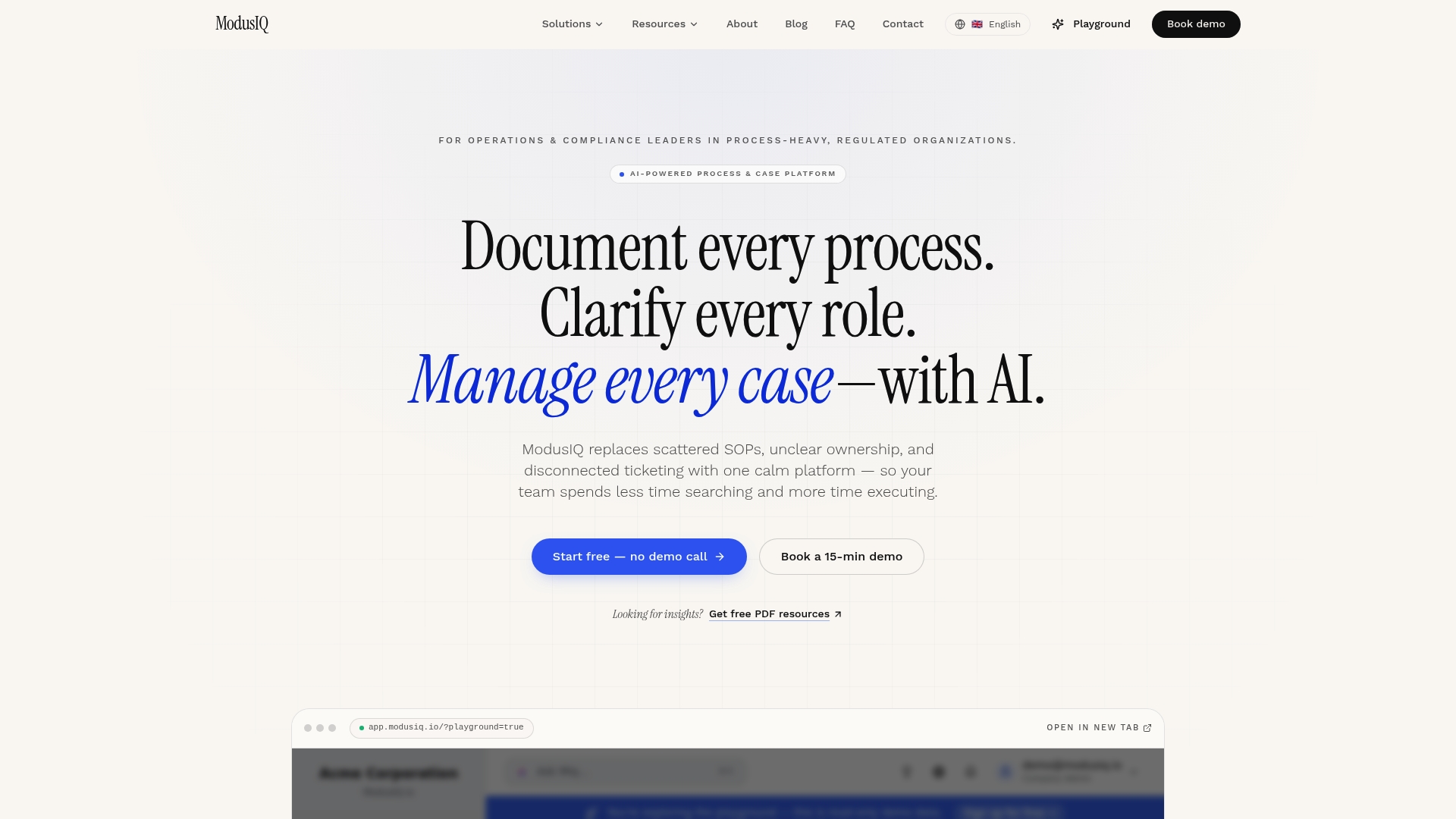
Modusiq's process management software gives operations and compliance teams living procedures with real owners, full audit trails, and AI-assisted process documentation, all deployable within a week. The platform supports ISO 27001 and GDPR requirements out of the box, with SOP software that replaces scattered documents with executable, versioned workflows. A free tier is available for individuals and small teams; organizational plans scale with your compliance and usage requirements.
Book a demo or start a free trial at Modusiq to see how quickly a first compliance-ready workflow can go live.