

A reliable DSAR workflow is an operational process with multiple stages that turns a legal obligation into a predictable, auditable routine. The stages run in sequence: receive the request, verify the requester's identity, define the scope, collect data across systems, review and redact, deliver the response, then close and archive. Three controls determine whether that sequence holds up under pressure: a named owner who is accountable for every open case, a deadline tracker that fires alerts before the clock runs out, and a documented system inventory that tells your team exactly where to search.
Here is how those stages map to immediate actions and SLA triggers:
- Receive and log: Capture the request in a central tracker within one business day; record the receipt date as Day 0 for deadline calculation.
- Acknowledge: Send a written acknowledgment to the requester promptly; confirm the applicable law and deadline.
- Verify identity: Apply a tiered verification check proportional to data sensitivity; document the method and outcome before proceeding.
- Scope: Define the date range, systems, and data categories in scope; record the scoping decision in the case record.
- Collect: Query each system in the inventory; capture vendor responses; log what was searched and what was found.
- Review and redact: Apply exemptions, redact third-party data, and document every withholding decision with a legal basis.
- Deliver and close: Send the response package through a secure channel; record proof of delivery; archive the complete case file.
Key Takeaways
A reliable DSAR workflow requires a named owner, a deadline tracker calibrated to the applicable state law, and a documented system inventory — without all three, even a well-written policy will miss deadlines.
| Point | Details |
|---|---|
| Named owner per case | Assign a privacy analyst to every open case; accountability must be visible, not assumed. |
| Deadline tracking by state law | California's CCPA/CPRA sets a 45-day window; Texas, Utah, Montana, and others vary — record the applicable law at intake. |
| System inventory before you search | Document every system, its data owner, and its search method before a request arrives, not during one. |
| Run quarterly mock requests | Mock DSARs reveal slow-degrading problems — unmonitored channels, departed owners, unresponsive vendors — before a real requester does. |
| Modusiq for operational execution | Modusiq's living SOPs, case management, and audit exports convert a DSAR policy into a working, auditable system. |
Table of Contents
- What does a step-by-step DSAR workflow look like?
- How do you capture and verify a DSAR reliably?
- How do you locate and collect responsive data across systems?
- What can you withhold, and how do you document it?
- How do you package and deliver the response?
- What records do you need to keep for each DSAR?
- Who owns the DSAR process, and how do you govern it?
- How do you handle complex or high-volume DSAR requests?
- How does automation speed up DSAR handling?
- DSAR SOP template and 30/60/90-day rollout plan
- What most DSAR programs get wrong
- Modusiq turns your DSAR policy into a working system
- Sources
What does a step-by-step DSAR workflow look like?
A DSAR workflow guide built around these eight stages converts ad-hoc handling into a repeatable SOP your team can execute, assign, and audit on every request.
Stage 1: Intake
- The request arrives through a monitored channel (web form, privacy inbox, support ticket).
- A privacy analyst logs it in the central tracker: requester name, contact, account identifier, request type, channel, and receipt date.
- The tracker auto-calculates the response deadline based on the applicable state law.
- The case is assigned to a named owner within one business day.
Artifacts: Completed intake record, auto-generated case ID, deadline entry in the tracker.
Stage 2: Acknowledgment
- Send a written acknowledgment to the requester within three to five business days.
- State the applicable law, the deadline, and the verification steps the requester must complete.
- Log the acknowledgment date and method in the case record.
Artifacts: Acknowledgment email or letter, log entry with timestamp.
Stage 3: Identity verification
- The privacy analyst applies the appropriate verification tier (low, standard, or high assurance) based on data sensitivity.
- Collect and document the verification evidence (account match, government ID, signed declaration).
- If verification fails or is incomplete, send a clarification request and pause the SLA clock per applicable law.
Artifacts: Verification checklist, evidence log, SLA pause notation if applicable.
Stage 4: Scoping
- The privacy analyst and data owner define the date range, data categories, and systems in scope.
- Record the scoping decision and any exclusions with a brief rationale.
- Escalate to legal if the scope touches privileged material or active litigation holds.
Artifacts: Scope definition record, escalation note if triggered.
Stage 5: Data collection
- Query each system in the inventory using account identifiers and date filters.
- Send vendor data requests with a documented SLA expectation.
- Log each system searched, the search parameters used, and the results (responsive records found or confirmed none).
Artifacts: System search log, vendor request records, collected data set.
Stage 6: Review and redaction
- Legal counsel or a senior privacy analyst reviews for exemptions, privilege, and third-party data.
- Redact or withhold material with a documented legal basis for each decision.
- A second reviewer signs off on the redaction log before the response is packaged.
Artifacts: Redaction log, reviewer sign-off, final data set.
Stage 7: Response delivery
- Assemble the response package: cover letter, data export, rights notice.
- Deliver through a secure, authenticated channel and capture proof of delivery.
- Notify the requester of any withheld categories and their right to appeal or complain.
Artifacts: Response package, delivery confirmation, cover letter copy.
Stage 8: Closure and audit
- Mark the case closed in the tracker; record the fulfillment date and total elapsed days.
- Archive the complete case file in the designated retention location.
- Flag any process gaps for the next monthly review.
Artifacts: Closed case record, archived file, review flag if applicable.
Pro Tip: Set a calendar alert at Day 30 (for a 45-day deadline) to trigger a mandatory status check. If collection or review is not complete by that point, the owner must either escalate or initiate the extension notice process immediately — not on Day 44.
Under California's CCPA/CPRA, businesses generally have a set period to respond, with an extension available when the requester is notified and the reason is explained. This deadline framework is the strictest in the U.S. consumer privacy context, and missing it is the scenario every SLA alert is designed to prevent.
How do you capture and verify a DSAR reliably?
Intake is where most DSAR programs quietly fail. A request that arrives through an unmonitored channel, gets logged two weeks late, or never triggers a deadline calculation is already a compliance problem before anyone has searched a single database.
Intake channels to publish and monitor
Publish at least two formal intake channels and monitor both daily:
- Secure web form: Structured fields reduce incomplete submissions and auto-populate the tracker.
- Dedicated privacy inbox (e.g., privacy@yourcompany.com): Monitored by the privacy team, not general support.
- Support ticket tag: A "DSAR" tag in your ticketing system that routes to the privacy queue automatically.
- Encrypted email option: For requesters who prefer direct contact; include PGP key or a secure upload link.
Any channel you do not actively monitor is a liability. A request that sits in a general inbox for three weeks has already consumed most of a 45-day window.
Required intake fields
Every intake record should capture:
- Full name and preferred contact method
- Account identifier (email address, customer ID, or username)
- Type of request (access, deletion, correction, portability, opt-out)
- Description of the data or processing activity in question
- Applicable jurisdiction (state of residence, if known)
- Receipt date (Day 0 for deadline calculation)
The CS Disco DSAR intake guide recommends collecting account identifiers and a clear description of the requested action as the minimum viable intake fields — anything less and scoping becomes guesswork.
Minimal acknowledgment template
Send this within three to five business days of receipt:
Log to send date, method, and recipient address in the case record.
Tiered identity verification
Enterprise DSAR guidance recommends a tiered approach that matches verification rigor to data sensitivity, keeping friction low for routine requests while protecting sensitive disclosures.
- Low assurance: Account email match or last-four of account number. Suitable for requests involving non-sensitive data categories.
- Standard assurance: Account match plus one additional identifier (billing address, phone number). Appropriate for most consumer access requests.
- High assurance: Government-issued ID or signed declaration, reviewed by legal or a senior privacy analyst. Required when the request involves health, financial, or other sensitive data categories.
Document the tier applied, the evidence collected, and the reviewer's name in the case record. If verification cannot be completed, send a written clarification request and note the SLA pause in the tracker.
Deadline calculation across U.S. state laws
The U.S. does not have a single federal DSAR deadline. Your tracker must record which state law applies to each request and calculate the deadline accordingly. California's 45-day window is the most commonly cited benchmark, but Texas, Utah, Montana, and other states each have their own statutory timelines and covered-entity thresholds. Record the applicable law in the intake record and set the deadline field accordingly.
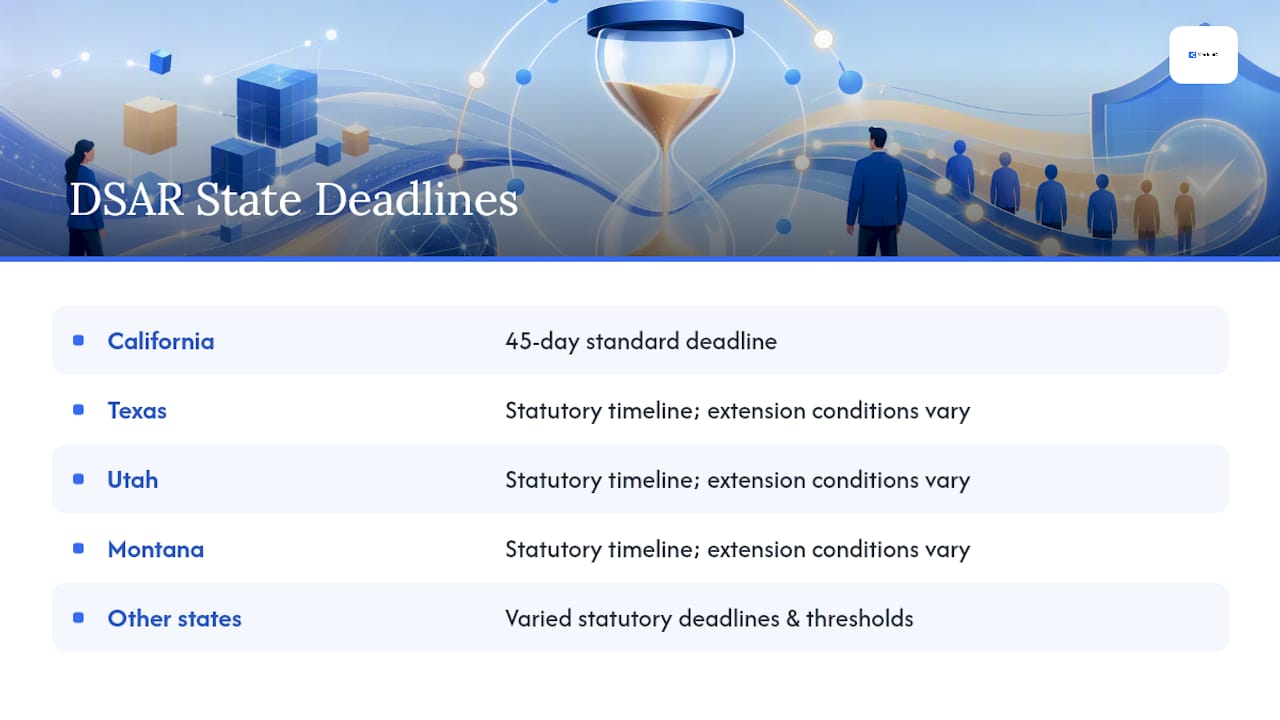
Pro Tip: Build a simple lookup table in your tracker: state, applicable law, standard deadline, and extension conditions. When a new request arrives, the privacy analyst selects the state and the deadline populates automatically. This eliminates manual deadline math and the errors that come with it.
How do you locate and collect responsive data across systems?
Data collection is the stage that most consistently blows timelines. The problem is almost never a lack of effort — it is a lack of a documented system inventory that tells the team where to look and how to export.
System inventory checklist
Before you run a single search, confirm each system is listed in your inventory with a searchable/exportable status:
- Production databases (CRM, ERP, billing)
- Customer support platforms (Zendesk, Salesforce Service Cloud, or equivalent)
- Marketing and analytics systems (email platforms, web analytics, ad platforms)
- Collaboration tools (email archives, Slack, Microsoft Teams)
- Cloud storage and file shares (Google Drive, SharePoint, S3 buckets)
- Backup and archival systems (note: backups often require a separate extraction process)
- Access and authentication logs (SSO, CIAM platforms)
- Third-party processors and subprocessors
For each system, record: system name, data owner, search method, export format, and average retrieval time. Consent lifecycle management platforms that propagate consent decisions across systems can also surface consent timestamps and revocation records that are directly relevant to DSAR scope.
Scoping techniques that speed collection
Precise scoping is the single fastest way to reduce collection time. Before querying any system, define:
- Date range: Start and end date of the data in scope (usually tied to the requester's account creation date or a specific processing period).
- Account identifiers: All known identifiers for the requester (email addresses, customer IDs, device IDs, IP addresses where linked to the account).
- Data categories: Which categories are in scope for this request type (e.g., access requests cover all personal data; deletion requests may exclude certain legally required retention categories).
- Event-based filters: For log data, filter by event type (login, purchase, support interaction) rather than pulling entire tables.
A well-scoped request that covers three systems with clear identifiers is faster to fulfill than a vague request that triggers a full-database scan across twelve systems.
Vendor coordination
For each subprocessor or vendor that holds responsive data, send a written request that includes:
- The case ID and applicable deadline
- The requester's account identifier(s) as known to the vendor
- The data categories requested
- Your expected response SLA (typically 10–15 business days to leave time for internal review)
- A request for written confirmation of what was searched and what was returned
Document every vendor request and response in the case record. If a vendor misses your internal SLA, escalate to the vendor owner and note the delay in the tracker.
Data collection checklist (copy into your case record)
- System inventory reviewed; all applicable systems identified
- Scope defined: date range, identifiers, data categories
- Each system queried with documented search parameters
- Vendor requests sent with SLA expectations
- Search results logged (responsive records found or confirmed none)
- Backup/archival systems checked if applicable
- Consent and preference records pulled from CIAM/consent platform
- All collected data stored in a secure, access-controlled staging location
CIAM and consent management platforms that provide timestamping, consent versioning, and self-service revocation records make this step significantly faster — the consent history is already structured and exportable rather than scattered across marketing and product databases.
What can you withhold, and how do you document it?
Not everything you find in a search is disclosable. The review stage is where legal judgment meets operational discipline, and the audit trail you build here is what protects the organization if a regulator or court later questions the response.
Common exemptions under U.S. frameworks
The specific exemptions available depend on the applicable state law, but the categories that most frequently justify withholding or redacting data include:
- Third-party personal data: Information about other individuals that cannot be separated from the requester's data without disclosing the third party's identity.
- Trade secrets and proprietary business information: Internal pricing models, algorithms, or business logic embedded in records.
- Attorney-client privileged communications: Legal advice sought or received in connection with the requester's account or a related matter.
- Law enforcement holds: Data subject to a preservation order, subpoena, or active investigation.
- Fraud prevention and security: Data whose disclosure would undermine fraud detection or security systems.
- Legally required retention: Records the organization is required to keep under a separate legal obligation (tax records, financial filings) that override a deletion request.
For each category withheld, document: the exemption category, the specific legal basis (statute and section), the reviewer's name, and the date of the decision. Vague redaction notes ("withheld for legal reasons") are not defensible.
Practical redaction rules
- Redact at the field level, not the document level, wherever possible. Withholding an entire record when only one field is exempt over-redacts and may itself be a compliance issue.
- Use a consistent redaction marker (e.g., [REDACTED — THIRD PARTY]) so the requester can see that a field exists but was withheld, and why.
- Never alter the underlying data. Work from a copy of the collected data set; the original remains in the case archive.
- Version the redacted output: save both the pre-redaction and post-redaction versions in the case file.
Role handoffs for complex exemptions
When a review surfaces attorney-client privilege, active litigation holds, or a law enforcement order, the case must route to legal counsel before any response is sent. The privacy analyst documents the escalation trigger in the case record, legal counsel reviews and signs off, and the decision is logged with the counsel's name and the date. Do not send a partial response while legal review is pending — pause the clock if the applicable law permits, or send an extension notice.

Pro Tip: Build a redaction template library with pre-approved language for each exemption category. When a reviewer applies a standard exemption, they select from the library rather than drafting language from scratch. This keeps redaction rationale consistent across cases and makes the audit trail far easier to review.
How do you package and deliver the response?
The response package is the requester's only view of how seriously your organization takes its privacy obligations. A well-structured package also reduces follow-up requests, appeals, and complaints — which saves time downstream.
What to include in the cover letter
The cover letter is not optional. It should state:
- The request type and the date received
- The applicable law and the response deadline
- A plain-language summary of the data categories included in the response
- The purposes for which the data was processed
- The recipients or categories of recipients to whom the data was disclosed
- The retention criteria or periods that apply
- The requester's remaining rights (correction, deletion, appeal, complaint to a regulator)
- Contact information for the privacy team or DPO
File formats and structured exports
- PDF: Use for the cover letter, rights notice, and any narrative summaries. PDFs are tamper-evident and easy for requesters to read.
- CSV or JSON: Use for machine-readable data exports (transaction records, event logs, preference histories). Structured formats let requesters import their data into other services, which is the point of portability rights.
- Redacted document copies: Provide as PDF with visible redaction markers; never as an editable format.
Label every file clearly: requester name, case ID, date, and file type. A zip archive with unlabeled files is a poor experience and creates ambiguity about what was provided.
Secure delivery and proof of delivery
Preferred delivery methods:
- Authenticated self-service portal: The requester logs in to download their package. The portal logs the download event automatically.
- Encrypted email: Use S/MIME or a secure email gateway that generates a delivery receipt.
- Secure file transfer link: A time-limited, single-use download link sent to the verified email address.
Document the delivery method, the timestamp, and the delivery confirmation in the case record. If the requester does not retrieve the package within a defined window (typically 30 days), send a reminder and log it.
Pro Tip: Include a one-page "Your Data Rights" summary in every response package, regardless of request type. It reduces follow-up questions, demonstrates good faith, and gives the requester a clear path to escalate if they are dissatisfied — which is better than a complaint filed with a regulator.
A central tracker with intake templates and defined owners converts unpredictable DSAR handling into predictable, auditable operations. The response package is the visible output of that system — and its quality reflects the health of everything upstream.
What records do you need to keep for each DSAR?
The audit trail is not a byproduct of good DSAR handling — it is the evidence that good handling occurred. Regulators and internal auditors do not take your word for it; they look at the records.
Required logs and records per request
For every DSAR case, retain:
- Intake record (channel, receipt date, requester identifiers, request type)
- Acknowledgment record (date sent, method, recipient)
- Verification record (tier applied, evidence type, reviewer name, outcome)
- Scope definition record (systems in scope, date range, data categories, exclusions)
- System search log (system name, search parameters, results summary, date)
- Vendor request and response records (request sent date, vendor SLA, response received date, data returned)
- Redaction log (fields/records withheld, exemption category, legal basis, reviewer name, date)
- Response package record (files included, delivery method, delivery timestamp, confirmation)
- Case closure record (fulfillment date, total elapsed days, applicable law, any extension notices sent)
Retention windows for DSAR evidence
Retention periods for DSAR records should align with your broader data retention policy and the applicable state law's enforcement window. A practical minimum:
Redaction logs carry a longer suggested window because they are the most likely artifact a regulator will request if a requester appeals or files a complaint.
Exporting audit packets
When a regulator requests evidence or an internal audit is scheduled, you need to produce a complete case packet quickly. Structure your case records so that every artifact for a given case ID can be exported as a single, ordered package: intake through closure, with timestamps and reviewer names on every entry. A case management system that generates this export automatically is far more reliable than assembling it manually from email threads and shared drives.
State-specific guidance from Montana and other states illustrates why records must capture which law applied to each request. The same request from a California resident and a Montana resident may have different deadlines, different exemptions, and different appeal rights — and the audit trail needs to reflect that distinction.
Who owns the DSAR process, and how do you govern it?
A DSAR workflow without named owners is a workflow that fails at the worst possible moment. Governance is not about org charts — it is about making sure every open case has a person whose name is on it and who knows what happens if they miss the deadline.
Roles and responsibilities
- Privacy lead or DPO: Owns the DSAR program overall. Sets policy, approves the system inventory, reviews escalations, and signs off on the SOP. Accountable for regulatory reporting.
- Privacy analyst: Handles day-to-day case management. Logs intake, sends acknowledgments, runs verification, coordinates collection, and tracks deadlines. The operational owner of each case.
- System/data owner: Responsible for executing searches within their system and returning results to the privacy analyst within the internal SLA. One named owner per system in the inventory.
- Legal counsel: Reviews cases involving privilege, litigation holds, law enforcement orders, or complex exemptions. Signs off on redaction decisions in those cases.
- Vendor owner: Internal point of contact for each subprocessor. Sends vendor data requests, tracks vendor SLAs, and escalates vendor delays.
Process-driven governance requires that every role is documented in the SOP with a named backup — not just a job title. When the primary owner is unavailable, the backup must be able to pick up the case without a handoff meeting.
Escalation matrix
| Trigger | Escalation To | Timeline |
|---|---|---|
| Verification incomplete at Day 10 | Privacy lead | Same day |
| Collection not complete at Day 30 | Privacy lead + data owners | Same day |
| Legal privilege or litigation hold identified | Legal counsel | Within one business day |
| Vendor SLA missed | Vendor owner + privacy lead | Same day |
| Extension notice required | Privacy lead approval | Before Day 40 |
| Regulator inquiry received | Legal counsel + DPO | Within 4 hours |
SOP essentials every organization should publish
Every DSAR SOP should cover, at minimum:
- Intake channels and monitoring responsibilities
- Verification standards by tier, with decision criteria
- System inventory with named data owners and search methods
- Internal SLAs for each stage (collection, review, delivery)
- Escalation contacts and triggers
- Extension notice process and approval chain
- Recordkeeping requirements and retention locations
- Training requirements and cadence
Pro Tip: Link every SOP section directly to the training module that covers it. When a new privacy analyst joins, they should be able to follow the SOP and find the corresponding training without asking anyone. This also makes it easy to identify training gaps when the SOP is updated.
Centralizing processes and knowledge in a single system — rather than across shared drives, email threads, and individual notebooks — is the governance change that most consistently reduces DSAR errors and missed deadlines.
How do you handle complex or high-volume DSAR requests?
Most DSAR programs are designed for the average case. The edge cases are where programs break down, deadlines get missed, and regulators take notice.
Triage rules for complex requests
Flag a request as complex at intake if it meets any of these criteria:
- The requester holds multiple accounts or has used multiple identifiers across systems
- The request covers an unusually long date range (more than two years of data)
- The request type involves deletion or correction, which requires propagation across all systems and vendors
- The data in scope includes sensitive categories (health, financial, biometric)
- The requester is also a party to active litigation or a regulatory investigation
- The request arrives simultaneously with a law enforcement hold on the same data
For complex cases, assign a senior privacy analyst as owner, schedule a scoping call with the data owners and legal counsel within five business days of intake, and document the complexity flag and rationale in the case record.
Phased responses and reasonable limits
When a request is so broad that a complete response within the statutory deadline is genuinely not feasible, consider a phased approach:
- Deliver the data categories that are ready within the standard deadline.
- Notify the requester that additional categories are being processed and provide a specific date for the second delivery.
- Document the phasing decision, the rationale, and the communication in the case record.
This is not the same as an extension. A phased response delivers something on time; an extension delays everything. Use phasing for volume, extension for complexity that genuinely requires more time.
Multiple simultaneous requesters
When multiple individuals submit requests in the same period, each case runs independently with its own deadline and case record. Do not batch them. The one scenario that requires coordination is when two requesters' data overlaps — for example, a joint account or a shared transaction record. In that case, legal counsel must review before any data is disclosed to either party, and the redaction log must document the third-party privacy analysis.
Coordination with litigation and legal holds
When a DSAR arrives for a requester who is also a party to active litigation or whose data is subject to a legal hold:
- Notify legal counsel immediately.
- Do not delete, alter, or export any data in scope until legal counsel confirms it is safe to proceed.
- If the applicable law permits, pause the DSAR clock and notify the requester that processing is temporarily delayed due to a legal obligation.
- Document every step of the legal hold coordination in the case record.
Communicating extensions and delays
When you need to invoke the extension provision (45 additional days under California's CCPA/CPRA, for example), the notice to the requester must:
- Be sent before the original deadline expires
- State the reason for the extension in plain language
- Give the new response date
- Confirm the requester's right to complain to a regulator if they believe the extension is unjustified
Log the extension notice date, the reason stated, and the new deadline in the tracker. Never send an extension notice after the original deadline has passed — at that point, the deadline has already been missed.
How does automation speed up DSAR handling?
Manual DSAR handling works at low volume. At scale, or under a tight deadline, the friction points compound: intake gets missed, deadlines are calculated wrong, collection requests sit in someone's inbox, and the audit trail is assembled from memory after the fact. Automation addresses each of those failure modes directly.
Automation opportunities in the DSAR workflow
- Intake routing: Web form submissions auto-populate the case tracker and trigger an acknowledgment email without manual intervention.
- Deadline calculation: The system reads the applicable state law field and sets the deadline automatically, with alerts at Day 15, Day 30, and Day 40.
- Centralized case records: Every action, document, and communication is logged against the case ID in one place — no hunting through email threads.
- System search orchestration: Automated connectors query integrated systems on demand and return results directly to the case record.
- Redaction helpers: Flagging tools identify fields containing third-party identifiers or sensitive data categories, reducing manual review time.
- Vendor request templates: Pre-built templates with case ID, requester identifiers, and SLA expectations are sent automatically when a vendor data request is triggered.
- Audit export generation: A single click produces a complete, ordered case packet for regulatory or internal audit purposes.
Automating the highest-friction steps first — routing, deadline alerts, and audit export — delivers the most operational return before you tackle more complex integrations like system search orchestration.
What to expect from a well-automated process
Teams that move from manual spreadsheets to a process and case management platform typically see meaningful reductions in the time spent on collection and review stages. The gains come from eliminating the back-and-forth of manual data requests, reducing the time spent assembling audit evidence, and catching missed steps before they become deadline problems rather than after.

A privacy team handling 20 to 30 DSARs per month on a manual tracker spends a disproportionate share of its time on coordination and status-chasing rather than on the substantive review work. Automating intake routing, deadline alerts, and vendor request generation shifts that balance significantly.
ModusIQ as an implementation example
A process and case management platform like Modusiq maps directly to the DSAR workflow stages described in this guide. Living SOPs replace static documents, so the intake checklist, verification script, and redaction template are always current and linked to the case record. Named owners are assigned at the case level, not just the program level, so accountability is visible on every open request. Deadline alerts fire automatically based on the applicable law field, and the audit export generates a complete, ordered case packet without manual assembly.
Business process automation applied to DSAR handling means the team spends its time on judgment calls — verification decisions, exemption analysis, redaction review — rather than on coordination and paperwork.
Pro Tip: When evaluating automation features for DSAR handling, prioritize in this order: deadline calculation and alerts first, centralized case records second, intake routing third. Everything else is valuable but secondary. A missed deadline is the highest-risk failure mode; fix that before automating anything else.
DSAR SOP template and 30/60/90-day rollout plan
A policy document that lives in a shared drive and is never updated is not an SOP. A working SOP is a living document with named owners, a version history, and a review cadence. Here is a compact template and a rollout plan your team can execute immediately.
One-page DSAR SOP outline
- Purpose and scope: This SOP governs the handling of all data subject access requests received by [Organization Name] under applicable U.S. state privacy laws.
- Intake channels: [List monitored channels, monitoring owner, and monitoring frequency.]
- Verification standards: [Low/Standard/High assurance tiers, criteria for each, and evidence requirements.]
- System inventory: [Link to the current system inventory document with named data owners.]
- Internal SLAs: Acknowledgment within 3–5 business days; collection complete by Day 25; review complete by Day 35; response delivered by Day 40 (for a 45-day deadline).
- Escalation contacts: [Privacy lead name and backup; legal counsel name and backup; vendor owner directory.]
- Response package template: [Link to cover letter template, rights notice template, and redaction marker library.]
- Closure artifacts: [List required records and retention location.]
- Review cadence: Monthly operational review; quarterly program review.
- SOP owner: [Name, title, last reviewed date, next review date.]
30/60/90-day implementation checklist
Days 1–30: Foundation
- Appoint a named privacy lead and backup for the DSAR program.
- Publish formal intake channels and confirm monitoring is active.
- Build the central tracker with required fields and deadline calculation.
- Draft and publish the DSAR SOP (use the outline above).
- Complete the system inventory: list all systems, data owners, and search methods.
- Send the SOP and system inventory to all data owners for review and sign-off.
Days 31–60: Operationalize
- Run one mock DSAR end-to-end using the new SOP and tracker.
- Identify gaps from the mock request and update the SOP.
- Establish vendor SLAs: send written SLA expectations to all subprocessors.
- Build the acknowledgment, extension notice, and response cover letter templates.
- Train all privacy analysts and data owners on the SOP and their specific roles.
- Set up deadline alerts in the tracker (Day 15, Day 30, Day 40).
Days 61–90: Refine and measure
- Process at least two live DSARs under the new SOP.
- Hold the first monthly operational review: review open cases, flag process gaps.
- Measure the first KPIs: time-to-acknowledge, time-to-fulfill, percent needing extension.
- Update the system inventory with any systems identified during live processing.
- Schedule the first quarterly program review and set the training refresh cadence.
KPI metrics table
| KPI | Target | How to Measure |
|---|---|---|
| Time-to-acknowledge | 3–5 business days | Days between receipt date and acknowledgment date |
| Time-to-fulfill | 35–40 days (for 45-day deadline) | Days between receipt date and response delivery date |
| Percent of requests needing extension | Under 10% | Extensions issued divided by total requests in period |
| Backlog by age band | No open cases over 35 days without escalation flag | Count of open cases by age band in tracker |
| Vendor SLA compliance | 90%+ on-time vendor responses | Vendor responses on time divided by total vendor requests |
Pro Tip: Run a mock DSAR every quarter using a test requester identity that touches at least five systems in your inventory. Mock requests reveal slow-degrading problems — an unmonitored intake channel, a system owner who has left the organization, a vendor that no longer responds to your template — before a real requester does.
What most DSAR programs get wrong
The programs that struggle most are not the ones that lack policy. They are the ones that have a policy document and no operational system behind it. The policy says "respond within 45 days" and the team is manually emailing data owners and tracking deadlines in a personal calendar. That gap between policy and operation is where most DSAR failures actually live.
Three things consistently separate programs that hold up under pressure from those that do not.
First, a single tracker that every case runs through. Not a shared spreadsheet that three people maintain differently, and not a folder of email threads. One system, one record per case, one source of truth for deadlines and status. The moment a case exists in two places, the deadline calculation becomes unreliable.
Second, a verification script that every analyst uses the same way. Verification decisions are the most legally consequential step in the workflow, and they are also the step most likely to vary by analyst. A written script with decision criteria for each tier eliminates that variation and makes every verification decision auditable.
Third, a monthly review that actually happens. Monthly operational reviews and quarterly program reviews are the mechanism that catches slow-degrading problems: a system owner who changed roles, a vendor that stopped responding, an intake channel that is no longer monitored. Without a scheduled review, those problems accumulate silently until a deadline is missed.
Modusiq's living SOP approach addresses all three: cases run through a single system, SOPs are versioned and linked to case records, and the audit trail is always current. For teams moving off manual tracking, that is the most direct path from policy to operation.
Pro Tip: After every mock request, ask one question: "If this had been a real request, would we have met the deadline?" If the answer is no, fix the bottleneck before the next live request arrives. The mock is only useful if it surfaces real gaps.
Modusiq turns your DSAR policy into a working system
Most compliance teams have the policy. What they are missing is the operational layer that makes the policy run without constant manual intervention. Modusiq closes that gap directly.
The platform maps to every stage of the DSAR workflow described in this guide. SOPs are living documents with named owners, not static files that go stale between audits. Cases are managed in a single system where every action, document, and deadline is logged against the case ID automatically. Deadline alerts fire based on the applicable law field, so no one is manually calculating Day 40 in a spreadsheet. Audit exports generate a complete, ordered case packet in one step, ready for a regulator or internal auditor.
For teams handling DSARs across multiple U.S. state laws, Modusiq's workflow automation and process management system give you the structure to run each case consistently regardless of which state law applies. Start with a free account and see how the platform handles your first live DSAR from intake to closure.
Sources
The following primary and practical sources were used as the basis for this guide and are worth bookmarking for ongoing reference:
- California Department of Justice — CCPA
- Texas Attorney General — Texas Data Privacy and Security Act
- Utah Department of Commerce — UCPA
- Montana DOJ — Consumer Data Privacy
- DSAR Workflow Guide for Access, Deletion, Correction (KeepSafe Cloud)